Two photos, one performance
Start with separate photos of you and a friend. Rap Duo AI brings both subjects into a shared scene, even when the originals were taken apart.
Two faces. One stage.
Turn you and a friend into an AI Rap Duo. Pick a stage, add a personal detail, and let Rap Duo AI bring your duet to life.
Explore Rap Duo AI with a free simulated attempt. Creating a finished video requires paid credits.
Rap Duo AI Video Generator turns reference photos into a short duet with generated sound. Give familiar faces a new scene to perform in.
Start with separate photos of you and a friend. Rap Duo AI brings both subjects into a shared scene, even when the originals were taken apart.
Use the DUO RAP trend as a starting point for a birthday surprise, a couple duet, or a friendly roast with a personal twist.
An AI Rap Duo can feature people, pets, or characters. Explore the examples below to find a pairing that suits your idea and photos.
Build your AI Rap Duo from two photos, a stage, and a story worth sharing.
Add two clear photos to Rap Duo AI Video Generator. Choose a stage and optional description, then check your quality, length, and credit cost.
Buy credits when you are ready to generate. Rap Duo AI creates the scene with native audio while you follow its progress.
Preview your AI Rap Duo, check the faces and sound, then download the MP4. Share your take on the DUO RAP trend.
Keep your focus on the duet, with creative choices and costs you can see before generating.
Rap Duo AI Video Generator offers different resolutions. Compare the available quality settings and their credit costs before committing to a render.
Give your AI Rap Duo a generated soundtrack alongside the visuals. Preview the performance to hear how the scene and vocals come together.
Try the DUO RAP trend in vertical 9:16, choose landscape 16:9, or use a square frame. Match the format to your intended post.
Rap Duo AI shows the required credits before generation. Failed paid renders receive automatic credit refunds, with activity recorded in your account.
Find your generation history in your account. Preview completed results and download the clips you want to keep before sharing them with friends.
Add a nickname, birthday, or shared memory to your AI Rap Duo description. Give the performance a reason to matter to your friend.
A little preparation helps Rap Duo AI Video Generator understand your subjects. Choose clear references and keep your creative direction simple.
Choose well-lit photos with one subject each. For a shared photo, keep both subjects visible side by side, without extra people crowding the frame.
Tell Rap Duo AI about an inside joke or special occasion. One specific detail gives the scene direction without needing a complete script.
Pick a setting that fits your DUO RAP trend idea. Keep the same photos while exploring stage, format, and length options before generation.
Compare Rap Duo AI Video Generator settings below. Resolution, model, and clip length determine the credits needed for your duet.
| Model / quality | 480p | 720p | 1080p |
|---|---|---|---|
| Standard | 75 | 145 | 360 |
| Fast | 120 | 240 | 600 |
| Pro | 145 | 290 | 720 |
| Ultra | 220 | 435 | 1080 |
Plan your DUO RAP trend clip before buying credits. Higher quality and longer videos use more credits.
A little direction. Your own duo.
Two photos. One stage. See what each template can make, then try it with your own duo.


2 photos → 1 rapLuxury Lobby
Two people
Sample · 12sA back-and-forth verse with your favorite co-star.


2 photos → 1 rapOrange booth
Two pets
Sample · 12sBig stage energy for your little companions.

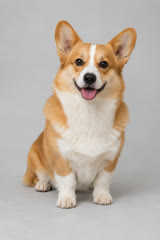
2 photos → 1 rapStreet Cypher
Person + pet
Sample · 12sYou take the verse. Your pet steals the show.
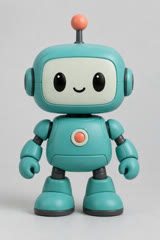
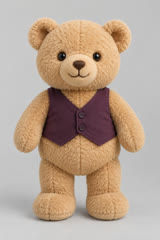
2 photos → 1 rapStudio Booth
Toys & characters
Sample · 12sA playful duet for two imaginary headliners.
Buy credits once and create at your own pace. Subscriptions are optional.
Make an AI Rap Duo with a one-time credit pack, or choose an optional subscription. Check the settings and required credits before you generate.
One Standard rap video, no subscription
Credits never expire
For occasional projects
Credits never expire
For regular creator work
Credits never expire
Practical answers about photos, creative choices, the free simulation, and paid video generation.
Create a short duet from your photos and description. Rap Duo AI pairs a generated scene with native audio for birthdays, couple moments, or friendly roasts. Faces, movement, and vocals can vary.
Add two subjects and choose a stage in Rap Duo AI. Include a nickname or shared memory for a personal angle. After paid generation, preview and download your version to share with friends.
Yes. Your first unpaid attempt simulates the waiting experience without creating a finished video. Rap Duo AI requires purchased credits for actual generation. Signup includes no free credits or downloadable custom clip.
No. Rap Duo AI Video Generator accepts separate photos with one subject each, or one photo of both subjects. Choose clear faces, good lighting, and an uncluttered frame for useful references.
Yes. Examples feature people, pets, and toys or characters. Use photos you have permission to use. Rap Duo AI interprets your references, but the examples show possibilities rather than guaranteeing an identical result.
No. Add an optional description to Rap Duo AI, or leave it empty for a general duet. A name, occasion, and memorable detail can guide the result. Exact wording and vocal delivery vary.
Yes. Select an available stage and set an occasion separately; your description stays in place. Rap Duo AI marks Original moves as coming soon. Choose another stage while that option remains unavailable.
Rap Duo AI Video Generator offers model, resolution, duration, and aspect-ratio controls. Available formats include vertical, landscape, and square. The table compares twelve-second clips; the Generate button shows costs for your selected settings.
A Standard 720p, twelve-second video uses 145 credits. Rap Duo AI shows the cost before generation, based on your settings. One-time packs start at $5.99; subscriptions are optional and unused credits carry forward.
Paid generation can take several minutes. Follow the progress card and check My videos for your task. The free Rap Duo AI simulation follows a separate timer and ends without a rendered clip.
Rap Duo AI reserves credits before a paid render. If the provider rejects or fails it, those credits are automatically refunded. Check your account activity; free simulated attempts never reserve credits.
Change your photos, stage, description, or settings before submitting again. Rap Duo AI creates a new result rather than editing the previous clip. Each new paid render uses credits, so review your choices first.
Preview your completed result in Rap Duo AI and download the MP4 when available. Check the faces, sound, and framing before posting. Keep a local copy of clips you want to reuse.
In Rap Duo AI Video Generator, a template fills your optional description without submitting a generation. Photos, stage, and occasion stay selected. Edit or clear the description before continuing with your own idea.
Open Rap Duo AI Video Generator and set up your own take on the DUO RAP trend. Try the free simulation; buy credits to create a finished clip.
Make our rap video